Sub Foundation
01 / 120 BPM / PLACEHOLDERA clean, rounded sub groove with soft octave accents.
0:00 / 0:08SYNTHESIZED SKETCH
MUCKY BASS ONE / COMING SOON
Sub that holds. Reese and FM that move.
The tools I use to finish a bass, in one playable instrument.
Stable low end. Expressive character. 40 custom presets by Mucky.
20 yearsof bass music experience
40 presetsMucky Essentials 01
One workflowcreate · shape · mix · perform
THE BASS IS THE FOUNDATION
A huge bass needs more than distortion. It needs weight, space and control. Bass One gives the low fundamental its own path, while you shape the movement and attitude above it.
Reese width. FM bite. Dirt with purpose. The tools I reach for, together in one place.
— MuckyPRESS PLAY / FIND YOUR DIRECTION
From the weight underneath
to the sound that leads the track.
Placeholder audio. These four original synthesized sketches preview the musical directions. They are not recordings from Bass One. Start with your volume low.
A clean, rounded sub groove with soft octave accents.
A wide, detuned bass riff over a steady mono low end.
A hollow FM pluck with a bouncing, syncopated groove.
A resonant sixteenth-note sequence with accents and short slides.
YOUR BASS CHAIN, ALREADY TOGETHER
Start with a sound. Shape its character. Make room for the kick. Finish the level. All without leaving the instrument.
Build the foundation and give it a voice.
Add the bite, texture and movement.
Make space and focus the frequencies.
Set the level and keep peaks in check.
A bass-focused workflow. Your kick, arrangement and final gain decisions still make the mix.
CUSTOM MADE BY MUCKY
40 custom presets built around real musical roles: basses, 808s, acid sequences, arps, keys, lead, stab and pad sounds.
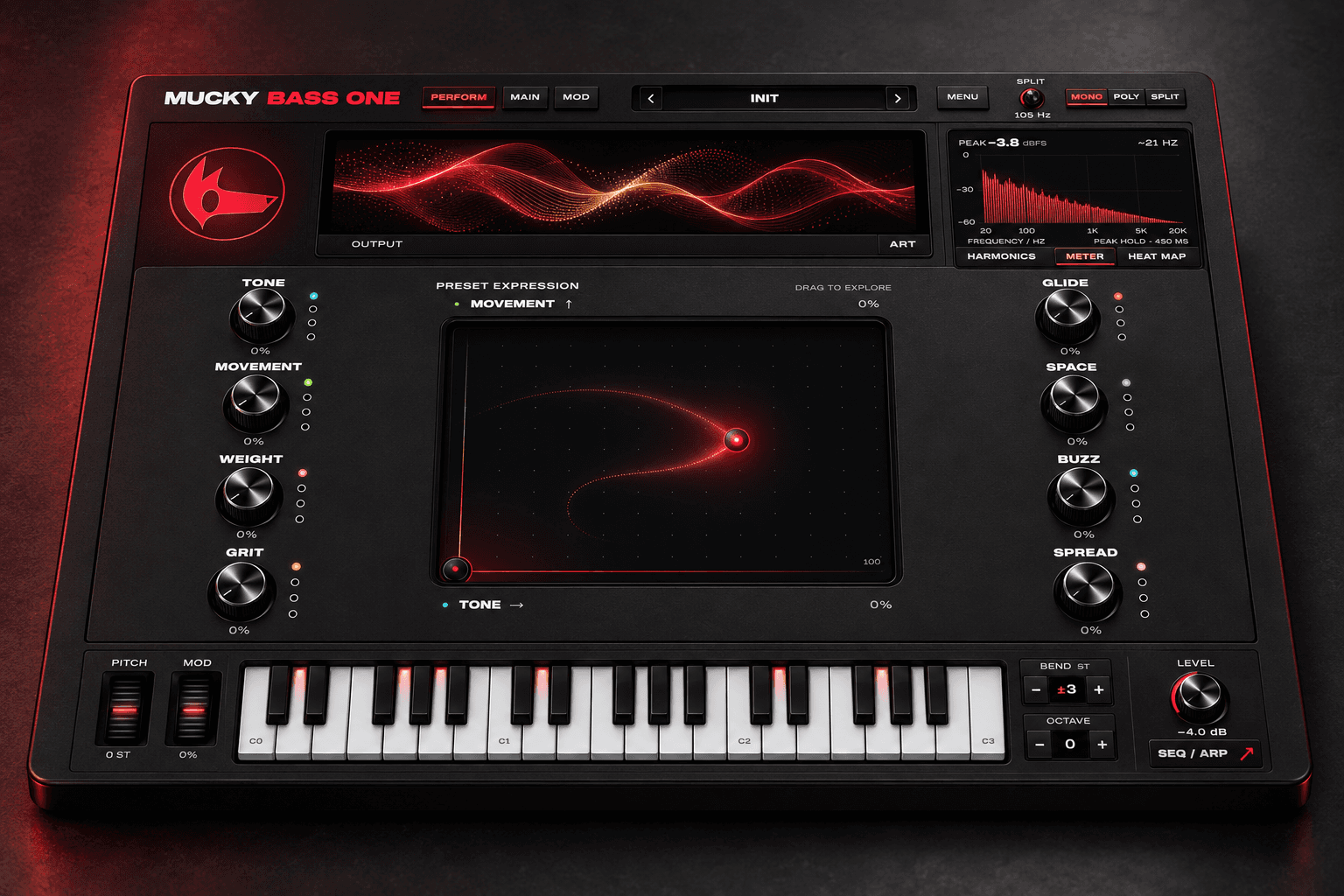
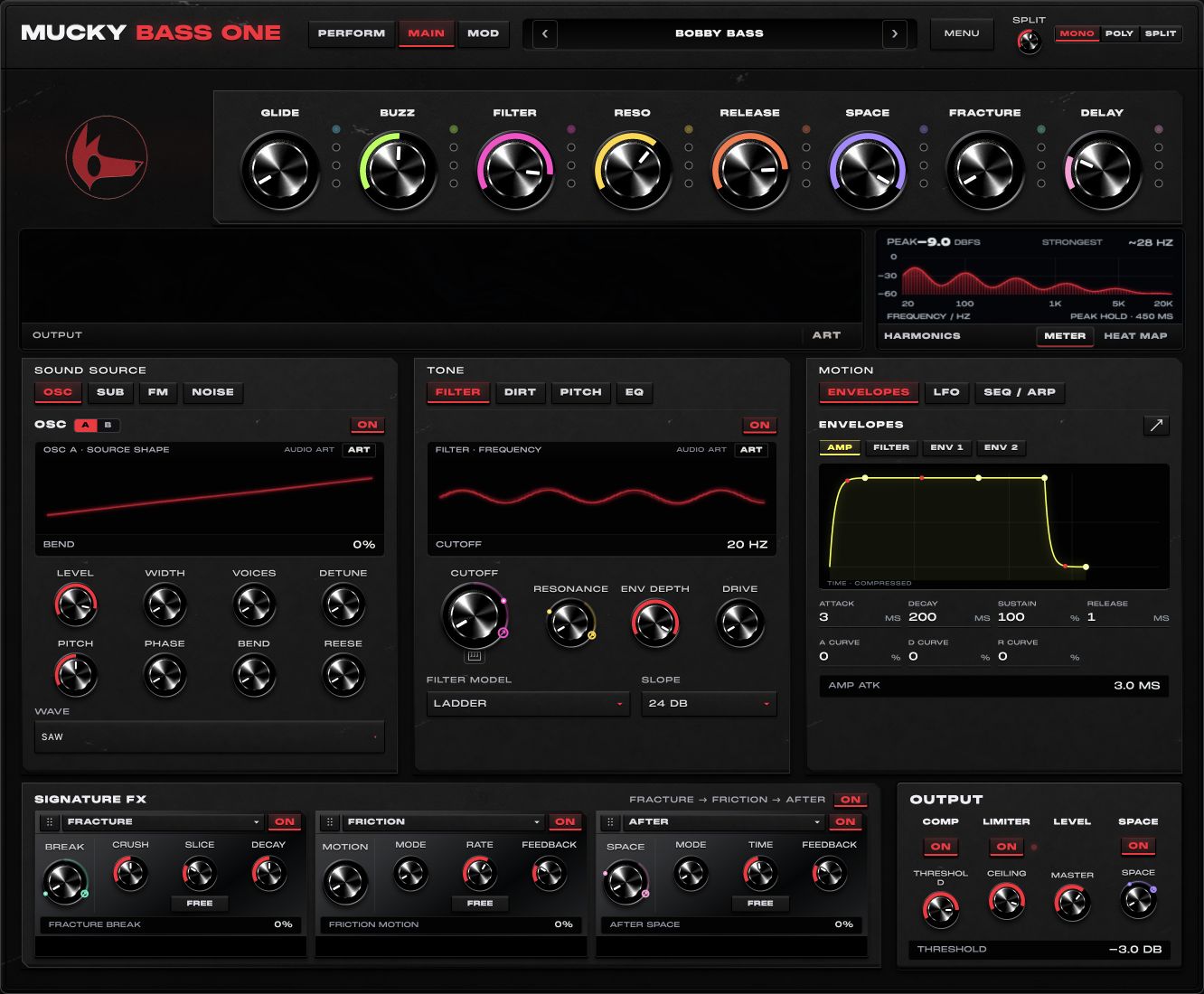
Load a starting point and make it yours with eight named macros. Get expressive in PERFORM, or open MAIN and build from the source.
Mucky Essentials 01 is a 40-preset pack for Bass One.
EXPLORE THE INTERFACE
OPEN IT UP
Simple when you want to play.
Detailed when you want to design.
Give the fundamental its own level, body and pitch drop. Adjust the protection split beneath the character layers, or set it to zero for full character processing.
Keep the weight easy to control while you build a more adventurous sound above it.
OSC A and B have independent pitch, level, phase, width and up to eight unison voices each. Explore eight wave families, Reese character and a hand-drawn 64-partial User wave.
Go from a focused bass to a broad, moving wall of harmonics in the same instrument.
Two-operator FM with ratio, index, high cut, independent level, velocity response and its own ADSR envelope.
Give the bass a readable attack, metallic knock or tonal edge without reshaping the entire sound.
Blend in a noise layer and shape its colour and level.
Bring air, friction and texture to an otherwise clean sound.
Transistor Ladder, Acid Diode and Sallen-Key models, with 12/24 dB slopes, drive, key follow and a dedicated filter ADSR.
Choose the bite and shape how the tone opens, holds and releases on each note.
Drive, Buzz, Erode and Cone, placed before or after the filter, with deeper character controls for asymmetry and instability.
Tune the kind of roughness you want, from subtle weight to broken texture.
Shape pitch movement, note-to-note slides and connected playing, with drift for additional variation.
Create an 808 drop, rubbery phrase or fluid bassline without redrawing the sound from scratch.
A resonant diode filter with cutoff, resonance and envelope-following motion that sweeps up or down.
Add a moving acid edge that responds to the sound’s attack.
Tuned cabinet resonance, transient thump and an octave-down layer, with grit and a clamp on the added energy.
Build a heavier, speaker-like body and control how hard it pushes.
Revoice the sound’s spectral shape through eight harmony choices, with formant and clarity controls.
Give a simple line a vocal quality or a richer harmonic identity.
Combine bit and sample-rate reduction with repeating slices. Set slice time freely or sync it to the track.
Turn a smooth phrase into grainy texture, broken repeats or rhythmic detail.
Chorus, flange and phase modes with rate and feedback controls, running freely or in sync.
Add width, swirl or a metallic sweep to a static sound.
Blend reversed, pitch-shifted phrases with interval, length and smear controls.
Create rising echoes and a sense of motion around the original notes.
Slap, Tape, Early and Cloud modes, with time and feedback controls and optional tempo sync.
Move from tight repeats to diffuse ambience and give the phrase a tail.
Three-band parallel dynamics with upward and downward processing and a Snap control for the attack.
Bring out quieter detail, contain peaks and shape how firmly the sound hits.
Turn captured fragments into grains, pitch repeats and reverse textures with Size, Motion and Shine.
Grow a short sound into an evolving texture for transitions, pads and unusual bass layers.
Work with eight editable macros and pair any two on the X/Y pad. Preset routes connect those controls to the sound.
Explore a patch with a gesture, then automate the movement you want to keep.
Shape the note with the amp envelope and two additional modulation ADSRs, alongside the dedicated filter and FM envelopes.
Control the arrival, body and tail, with separate movement for different parts of the sound.
Draw modulation shapes, run them freely or in sync, and assign movement through the modulation routing matrix.
Build wobble, evolving texture and rhythmic variation into the patch.
MONO shares one voice. POLY gives each note its own sub and upper voice. SPLIT combines polyphonic upper voices with one lowest-note sub anchor; MPE adds per-note expression.
Choose focused basslines, full chords or an anchored low end beneath expressive upper parts.
Turn held notes into a phrase with Up, Down and Up/Down patterns and timing controls.
Find a musical pattern before drawing every note in your DAW.
Set scale, style and range. Generate a starting point, vary it, then shape density, ties, slides and accents.
Get past the empty piano roll and keep the decisions that make an idea yours.
Edit the generated phrase in the piano roll and use MIDI output where supported by your host.
Develop the notes alongside the sound and carry the musical idea into your wider workflow.
Trigger ducking from audio sidechain or MIDI. Choose focused EQ ducking or full classic ducking, and shape attack, hold and release.
Make space for the kick without rebuilding a ducking setup for every patch. Sidechain routing depends on your host.
Three EQ models let you shape the output’s frequency balance inside the instrument.
Focus weight and presence before balancing the bass against the rest of your track.
Shape dynamics, control master level and manage peaks in the same instrument.
Keep the output in check as the patch becomes more intense, with headroom for your mix.
Add space to the sound and monitor frequency balance and level with spectrum displays, meters and animated output art.
See what changes as you listen and find the amount of ambience your part needs.
Mucky Essentials 01 contains 40 custom presets, each with eight named macros, spanning bass, 808, acid, poly, keys and more.
Start from a musical role and customise it to fit your track.
Search and filter by type, tags and pack. Mark favourites and save personal copies.
Get back to your best sounds quickly and keep variations without losing the original.
Save your own presets, import packs and export a selected pack through the plug-in’s preset tools.
Keep the sound, processing and performance routes ready for your next session.
Move between detailed module controls and a focused performance view, with window-size options.
Choose how much detail you need at each stage of making the sound.
WHY A DEDICATED BASS INSTRUMENT?
A general-purpose synth gives you a blank canvas. Bass One starts with the bass workflow: a dedicated low foundation, character layers, movement and mix tools that belong together.
Shape the upper layers around a dedicated sub, with mono bass control in expressive voice modes.
Reach for one preset and a few performance controls before diving into detailed sound design.
Save the sound, modulation and built-in processing in the same preset. Come back to the whole idea.
GET IN EARLY / MAKE SOMETHING NOW
Join the Bass One early-access list and get my Signature Mucky Drums sample pack for free.
Get the free pack right here.
Follow @muckybeats for the upcoming “comment BASS” offer, bass tips and release news.
Enter your email. I’ll send the drums now and Bass One news when there’s something to share.
MUCKY BASS ONE / PRELAUNCH
20 years of producing bass music, brought into one focused instrument.
Checkout is not open yet. Joining the list is free.
Final downloads and system requirements will be confirmed before purchase opens.
Bass One is in prelaunch. Join the list for early-access news. Signing up does not unlock a plug-in download or charge you for a licence.
Use the email form above. We’ll email you a private download link for the Signature Mucky Drums pack. The link lasts seven days. No Bass One purchase is required. If the email does not arrive, contact info@muckybeats.com.
The four clips on this preview page are synthesized placeholders to demonstrate the player and musical directions. They are labelled individually and will be replaced with recordings from Bass One.
Planned formats are AU, VST3 and Standalone on macOS, and VST3 and Standalone on Windows. Confirmed operating systems, supported hosts and installer details will be published before checkout opens.
Bass One brings the essential sound and processing tools together to help you get to a controlled bass quickly. You still choose the sound, leave headroom and balance it against your kick and the rest of your track.